Core Concepts
Research Workflow
SciTeX covers the full research pipeline, from literature review to publication:
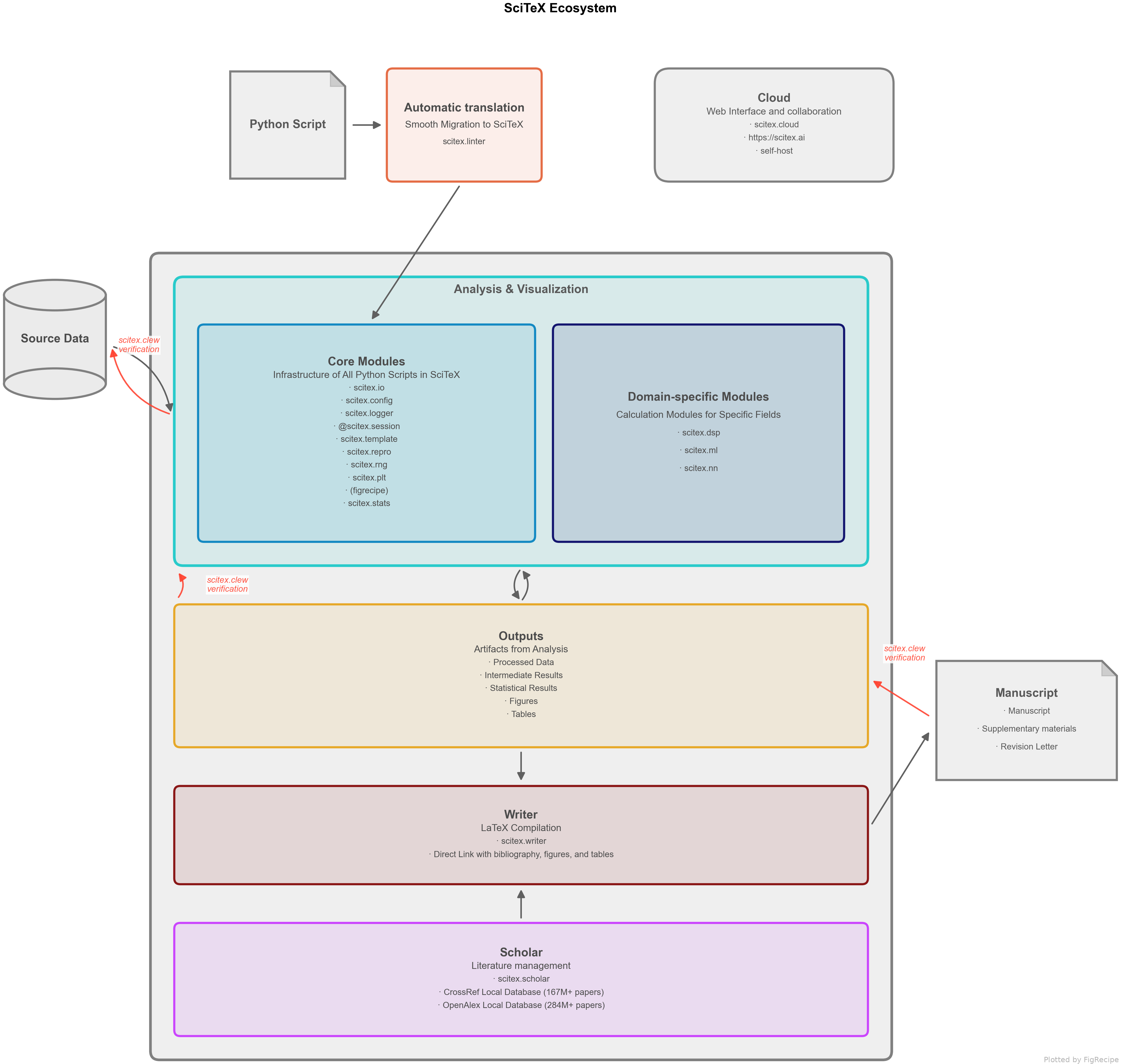
Each stage maps to a SciTeX module. The @stx.session decorator ties them
together, ensuring every step is reproducible and provenance-tracked.
Architecture
SciTeX is organized around a simple principle: every research script should be
a reproducible, self-documenting unit of work. The @stx.session decorator
enforces this by managing outputs, logging, and configuration automatically.

Modules are grouped into three layers – Experiment infrastructure (blue), Analysis & Visualization tools (orange), and Publication (purple). See Module Overview for the full module reference.
The Session Model
@stx.session is the core abstraction. It wraps a function and provides:
Output directory:
script_out/FINISHED_SUCCESS/<session_id>/Logging: All stdout/stderr captured to
script.logConfig injection: YAML files from
./config/merged and injectedCLI generation: Function parameters become
--flagsProvenance: File hashes recorded to SQLite for reproducibility
import scitex as stx

@stx.session
def main(
    lr=0.001,               # --lr 0.01
    epochs=100,             # --epochs 50
    CONFIG=stx.INJECTED,    # from ./config/*.yaml
    plt=stx.INJECTED,       # pre-configured matplotlib
    logger=stx.INJECTED,    # session logger
):
    """Train a model. Docstring becomes --help text."""
    logger.info(f"Training with lr={lr}, epochs={epochs}")

    # stx.io.save paths are relative to session output dir
    stx.io.save({"lr": lr, "epochs": epochs}, "params.yaml")

    return 0
Session output tree:
train_out/
├── RUNNING/                    # while script runs
│   └── 20260213_143022_AB12/
│       ├── params.yaml
│       └── train.log
└── FINISHED_SUCCESS/           # after successful exit
    └── 20260213_143022_AB12/   # moved here on completion
        ├── params.yaml
        └── train.log
Universal I/O
stx.io.save and stx.io.load dispatch on file extension:
Extension |
Data Type |
Backend |
|---|---|---|
|
DataFrame |
pandas |
|
ndarray |
numpy |
|
any object |
pickle |
|
dict |
PyYAML |
|
dict/list |
json |
|
Figure |
matplotlib |
|
dict/array |
h5py |
|
dict |
scipy.io |
|
state_dict |
torch |
|
DataFrame |
pyarrow |
When saving a matplotlib Figure, SciTeX also exports:
A
.csvwith the plotted data (extracted from axes)A
.yamlrecipe for reproducing the figure
Provenance Tracking (Clew)
Inside @stx.session, every stx.io.save and stx.io.load call
records the file’s SHA-256 hash to a local SQLite database. This enables:
Verification: Check if output files have been modified since creation
DAG reconstruction: Trace which inputs produced which outputs
Cross-session linking: If script B loads a file that script A produced, the parent-child relationship is recorded automatically
# Check verification status
scitex clew status

# Verify a specific session
scitex clew run <session_id>

# Generate a dependency diagram
scitex clew mermaid
Configuration
SciTeX uses a priority-based config system:
CLI flags (highest priority):
--lr 0.01Config files:
./config/*.yaml(merged alphabetically)Function defaults (lowest priority):
lr=0.001
# config/experiment.yaml
DATA_DIR: ./data
MODEL:
  hidden_size: 256
  dropout: 0.1

# config/PATH.yaml
OUTPUT_DIR: ${HOME}/results    # env var substitution
Access in code:
@stx.session
def main(CONFIG=stx.INJECTED, **kw):
    data_dir = CONFIG["DATA_DIR"]
    hidden = CONFIG["MODEL"]["hidden_size"]
Best Practices
One session per script: Each
.pyfile should have one@stx.sessionfunctionUse relative paths in save/load: They resolve relative to the session output directory
Return 0 for success: The exit code determines the output directory name (
FINISHED_SUCCESSvsFINISHED_ERROR)Put config in
./config/*.yaml: Keeps parameters separate from codeUse
stx.repro.fix_seeds(42)for determinism: Fixes numpy, torch, random seeds in one call